TL;DR: If you are looking for the YARA rule to detect CVE-2026-21509, jump to the YARA section below.
A new 0-day vulnerability in MS Office
On the 26th January 2026, Microsoft published an advisory and a patch for a new vulnerability in MS Office, already exploited in the wild: https://msrc.microsoft.com/update-guide/vulnerability/CVE-2026-21509
At the time, no technical details were provided except that the vulnerability can be exploited using MS Office documents, and that it can be mitigated by setting a specific key named {EAB22AC3-30C1-11CF-A7EB-0000C05BAE0B} in the registry.
First guess - How the exploit could look like
In the following days, I was looking how the exploit for this new vulnerability could look like, in order to detect it.
It turns out that EAB22AC3-30C1-11CF-A7EB-0000C05BAE0B is a specific CLSID (class id), corresponding to the Shell.Explorer.1 COM object, which can be used to open the legacy Internet Explorer engine (aka Trident/MSHTML) from any application.
This type of object was already mentioned in an article from 2018 by Yorick Koster as a way to download and execute malicious files from a document (after a few clicks from the user). But since 2018 it had not been declared as an actual vulnerability, so there must be something new that pushed Microsoft to publish an emergency fix in 2026.
So to exploit CVE-2026-21509 from MS Office files, I figured that one could either embed an OLE object of type Shell.Explorer.1 into a MS Office document, or insert an external relationship with a special URL that would trigger the use of the Internet Explorer engine, as it was the case for CVE-2021-40444 with “mhtml:” URLs.
To start hunting for potential exploits, I built a script using oletools which tries to identify both cases: OLE objects with that specific CLSID, or external relationships with special URLs that do not start with “http”. It works with most types of MS Office files: OpenXML, OLE/CFB and RTF: https://gist.github.com/decalage2/26b6
Important: this script can be used to hunt and analyse suspicious files in an attempt to identify CVE-2026-21509 samples, but it is by no means a foolproof detection method as it may catch other documents not related to the vulnerability.
Also note that it is not possible to do exactly the same thing just with YARA rules at least for OpenXML documents (docx, xlsx, pptx), because the standard YARA engine cannot decompress files from a zip archive before searching for strings. You would need an additional tool to decompress files and then use YARA rules. However, it would be possible to write a YARA rule to detect legacy OLE/CFB documents (doc, xls, ppt) or RTF files containing Shell.Explorer.1 OLE objects.
Note: to test the script, I used Yorick Koster’s PoC from 2018 to build MS Office files containing Shell.Explorer.1 objects: https://gist.github.com/securifybv/9e085c93b330441576c883193166fcbe - The PoC creates a DOCX file, which can be easily converted to DOC and RTF formats.
Malicious samples in the wild
On the 1st February 2026, CERT-UA published an article reporting several malicious documents exploiting CVE-2026-21509, attributed to APT28. Those samples were also published on MalwareBazaar with the tag “CVE-2026-21509”.
It turns out they can all be detected by the olecheck script I had released earlier. The script shows that the samples are RTF documents containing “Shell.Explorer.1” OLE objects, so the initial guess was right! The original script is available here: https://gist.github.com/decalage2/26b6

Analysis with oletools - URL extraction
Moreover, I also improved the development version of oletools to detect “Shell.Explorer.1” OLE objects in RTF documents, using the rtfobj tool:
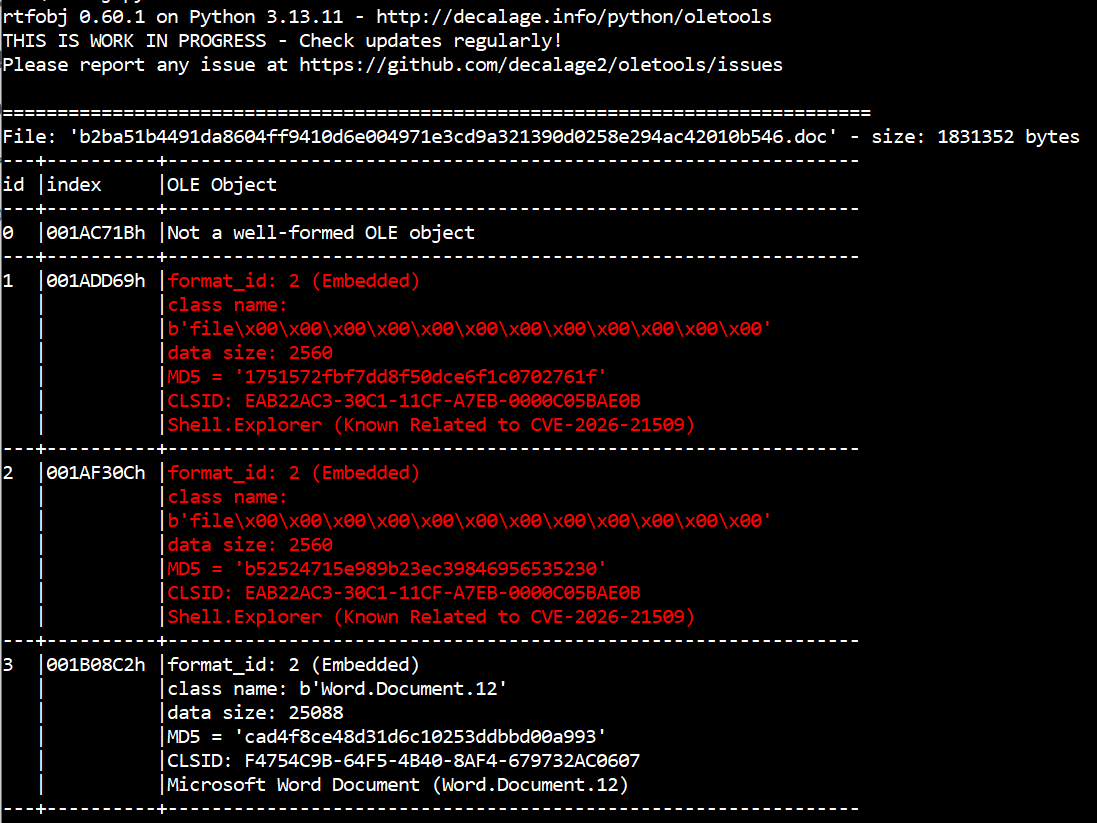
It is then possible to extract all the OLE objects and save them into files using the option rtfobj -s all <file>. Once you open those files, URLs can be clearly seen in the data. Those are the URLs from where the malicious payload is downloaded, then executed:



To install or update oletools with the latest development version, see the instructions here.
Between the 2nd and 4th February, several articles were published with more samples, technical details and an analysis of the whole attack campaign:
- Zscaler - APT28 Leverages CVE-2026-21509 in Operation Neusploit
- SynapticSystems - APT28: Geofencing as a Targeting Signal (CVE-2026-21509 Campaign) describing the vulnerability itself and the analysis of the RTF samples
- Trellix - APT28’s Stealthy Multi-Stage Campaign Leveraging CVE‑2026‑21509 and Cloud C2 Infrastructure
But how does the vulnerability work?
In fact exploiting this vulnerability does not involve fancy malformed documents nor shellcode. If you look at each of the malicious samples, those are just normal RTF documents containing OLE objects of class Shell.Explorer.1 configured with a URL. When the document is opened, MS Word instantiates the OLE object, which loads the legacy Internet Explorer engine to open the URL.
That legacy web browser engine is much less strict and secure than recent Windows features, and this is the core problem. In the malicious samples that have been discovered, the URLs point to LNK files, which are automatically executed without prompting the user, and then any malicious payload can run.
In other words, this behavior allows attackers to bypass security measures that should block insecure file downloads.

It appears that Microsoft fixed this kind of issue a few years ago by blocking a number of OLE objects known to allow untrusted code execution from MS Office documents. This was done by setting a “kill bit” in the registry for each class of insecure OLE object.
But for some reason, Microsoft blocked all insecure OLE objects including Shell.Explorer and Shell.Explorer.2, except Shell.Explorer.1 which was overlooked!
Some people noticed it such as Yorick Koster in 2018, but it’s only in January 2026 that this flaw was exploited in actual cyber attacks. Moreover, the use of RTF documents and LNK files probably made it more effective by executing malicious code without user confirmation. This is when Microsoft decided to fix it as CVE-2026-21509.
Automating detection with YARA
Now that we know more about the vulnerability and how the malicious documents look like, how can we automate the detection?
Since all the known exploits use the RTF format, we can build a YARA rule because the Shell.Explorer.1 CLSID {EAB22AC3-30C1-11CF-A7EB-0000C05BAE0B} is always encoded the same way in RTF. OLE objects are encoded in hexadecimal, and the CLSID appears as the string “C32AB2EAC130CF11A7EB0000C05BAE0B”.
I created a YARA rule which checks the presence of that string, the RTF header and the keyword required for an OLE object. It is available in this repository: https://github.com/decalage2/detect_CVE-2026-21509
There is no good reason for legitimate documents to contain such an OLE object (which is used to embed the Internet Explorer engine into other applications), so there should be very few false positives.
The YARA rule comes in two versions:
CVE-2026-21509_RTF.yarwhich allows whitespace characters between each character of the CLSID string. This is slower, but it behaves like the RTF parser in MS Word which allows such whitespaces.CVE-2026-21509_RTF_nows.yarwithout whitespaces. This rule is faster, but it may miss some detections if whitespaces or newline characters are inserted in the CLSID string.
Also note that the YARA rule has been uploaded to MalwareBazaar, so it should trigger each time a new CVE-2026-21509 sample is uploaded: https://bazaar.abuse.ch/browse/yara/SUSP_RTF_with_potential_CVE_2026_21509_exploit_nows/
Here is the original version of the YARA rule: